Development Environment
The Controller Core is designed to be reusable on multiple platforms. It is built into a static library that might be used in multiple applications. For example, it might be used on Raspberry PI, an embedded system like STM32 or even in the browser in WebAssembly environment.
IDE
The build system that the project uses is CMake. The minimum required CMake
version is 3.18.Technically any development environment works as long as it can
use CMake to build however the suggested IDE is
CLion. It has great code completion, static
code analysis features and supports remote development which is really useful
for developing for Raspberry PI environment.
Setting up CLion for Linux
You only need to make sure to install the latest build-essential package
before creating the toolchains and CMake environments.
sudo apt-get update- This updates the system's package listsudo apt-get full-upgrade- This upgrades all the packages and their dependencies to their latest versionsudo apt-get build-essential- This installs a lot of libraries and the latest C/C++ compiler that is available.
Setting up CLion for Windows
JetBrains has a great
guide
how to set up CLion for Windows development. Make sure to download and install
any of the C++ compilers before creating the toolchain because CLion
automatically detects it for you. Once the toolchain is ready the project can be
built with the hammer icon. MinGW64 is tested and suggested but it should work
with other packages as well. However MinGW32 doesn't know std::mutex out of
the box, but it can be
solved
if it's really necessary.
Setting up CLion for macOS
Follow JetBrains's tutorial
Build the application
Once the setup is ready you can build the application by clicking on the hammer icon in the menu. This will build the static library and the test executable as well. You don't have to worry about the dependencies, all of them will be automatically downloaded and built in the CMake load phase and linked in the build phase.

Code Analysis
CLion has a lot of code inspections and also uses
Clang-Tidy to make it even more
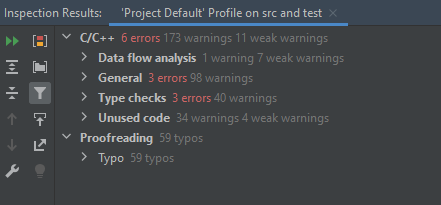
superior. The code inspection can be run by clicking Code > Inspect Code...
menu. Make sure you don't run it on the whole project, but instead you create a
custom scope which only checks the src and test folder. The whole project would
inspect all the downloaded and built files which takes forever and also out of
the scope. Once it's finished the result can be seen in the Inspection Results window.
You can read more about static analysis here.
Troubleshoot
It might happen that the compilation just hangs and never finishes. It is most probably because the compilation is happening on 12 threads by default and the Raspberry just runs out of memory.
In this case the maximum threads should be limited in 4 or maybe 8 by setting -j 4 in CLion flags.