User session
Login
When the user clicks on the login button they are redirected to Spotify. Once they agree to grant permissions the Spotify redirects them back to the backend and the backend provides 3 tokens to the frontend:
- Access Token: Used to communicate with the backend
- Refresh Token: Used to request new access tokens
- Spotify Access Token: Used to communicate with Spotify
These tokens are then saved to the browser's localstorage. The user is considered to be logged in if these tokens are present in localstorage. This is safe because even if a user puts these entries in the localstorage manually they can't make a request without a valid token.
The access tokens however expire after 1 hour. Both the backend's and Spotify's access token has a 1-hour expiration date. It's a good practice to keep this expiration date short because of security reasons.
Refresh Token Flow
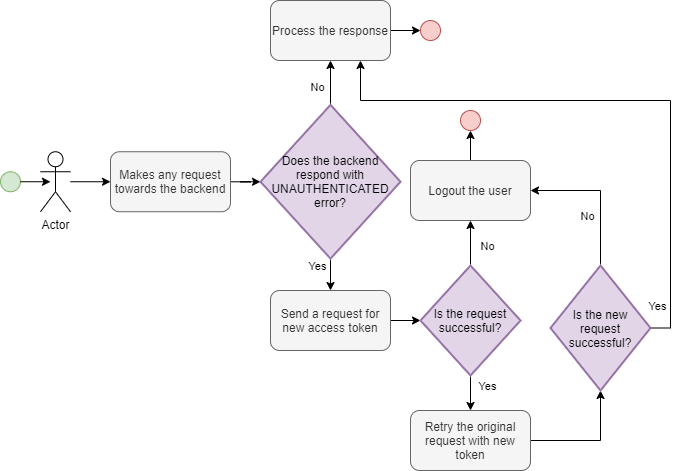
Logging in every 60 minutes would mean a pretty bad user experience. That's why the backend provides a refresh token so the frontend is able to acquire new access token when necessary. But it has to be seamless for the user. Preferably they should not even notice that a new token had to be requested.
Refresh backend token
This is what happens when the backend's access token expires:
Refresh Spotify token
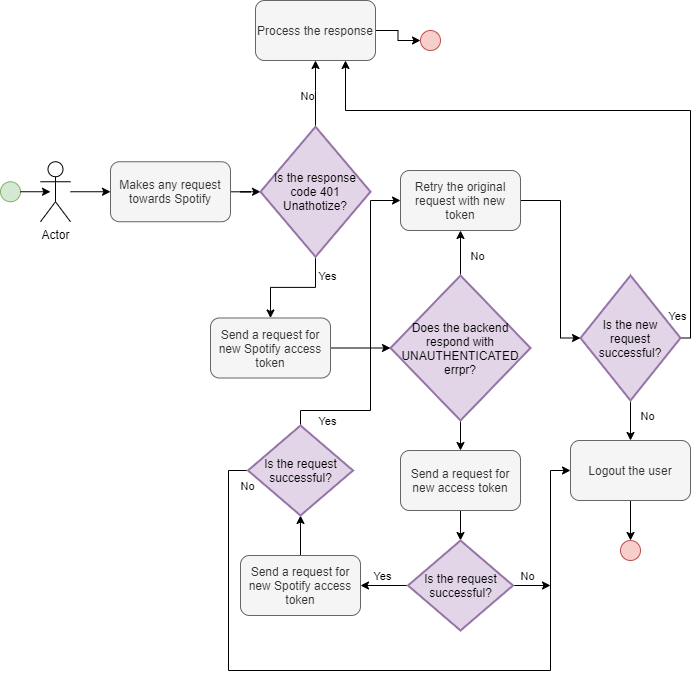
The frontend does not have the Spotify's refresh token, only the backend has it. So the frontend has to go for the backend in this case as well. However the refresh Spotify token query is not available without a valid backend access token so this flow is a little bit more complicated:
Apollo Link
The flows are complicated but fortunately Apollo Client has the Link feature. These links can be chained together the implementation is very straightforward with them. Each link handles the error once so if any of them fails for second time it automatically falls back to logging out the user.