Development Environment
The code is built by Maven which makes it possible
to run the application by the mvn spring-boot:run command
IDE
The suggested IDE is IntelliJ IDEA which is the best suited for Spring Boot projects. It has the best code completion, debug, static code analysis and code formatting features.
Setting up the IDE
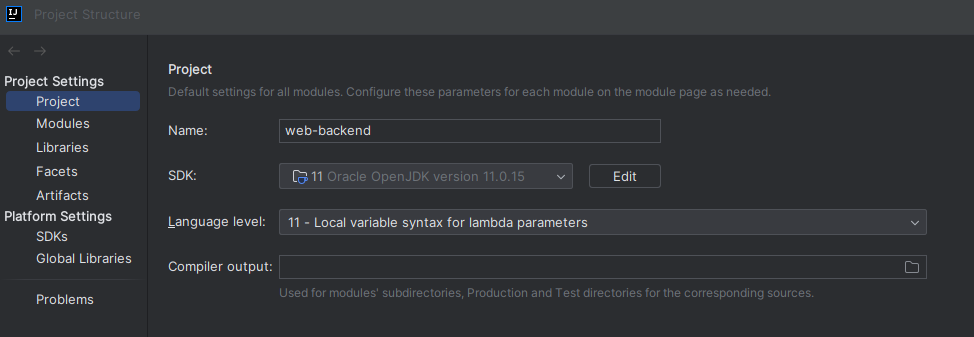
Make sure to have Java 11 JDK installed and set in the File > Project Structure.
Environment variables
The following environment variables need to be set in order to run the application:
- DATASOURCE_URL: The jdbc URL for the local database.
- E.g.(with DB name
bassboost): jdbc:mysql://localhost/bassboost?serverTimezone=GMT
- E.g.(with DB name
- DATASOURCE_USERNAME: The username for the local database instance
- DATASOURCE_PASSWORD: The password for the local database instance
- OPENAI_KEY: API key for OpenAI
- SPOTIFY_CLIENT_ID: Client ID for Spotify Oauth2 authentication
- SPOTIFY_CLIENT_SECRET: Client Secret for Spotify Oauth2 authentication
- GOOGLE_APPLICATION_CREDENTIALS: Key generated for the App Engine service account. Used for the AudioDemo feature.
- E.g.: src\main\resources\xy.json
- SPRING_PROFILES_ACTIVE: value=dev
Other setup is not required to run the project. The IDE downloads all the dependencies on the first opening and makes all the necessary configuration out of the box. The project can be run using the play icon in the toolbar.
Code analysis
For static code analysis the project uses the Maven Checkstyle Plugin. The IDE needs a plugin to support the checks in real time. It is configured using this guide.